Downloading Measure Specifications and Value Sets
Before documenting clinical care so that it can be qualified in Prime Suite Reporting 2020 (PSR 2020), you should be familiar with two resources: the eCQI Resource Center and the Value Set Authority Center (VSAC).
- eCQI Resource Center: The eCQI Resource Center contains the specifications that explain the logic used by each measure in the CMS Quality Reporting Programs.
- VSAC: The Value Set Authority Center is offered by the U.S. National Library of Medicine. It publishes the Value Sets used by the measures in the CMS Quality Reporting Programs. Value Sets are lists of codes that can be used to indicate that the clinical care required by a measure occurred. For example, in measure CMS 156 Use of High-Risk Medications in the Elderly, each high-risk drug is identified by a Value Set. Amoxapine is a high-risk medication when taken by the elderly. The Amoxapine Value Set contains 5 RxNorm codes that can be used to identify a prescription for Amoxapine. Only prescriptions based on one of those RxNorm codes will qualify for the CMS 156 criteria.
PSR 2020 uses Values Sets when calculating compliance with measure specifications. You must obtain a license for the Unified Medical Language System® (UMLS) in order to see the content of the Value Sets. These licenses are free and can be requested from the UMLS Terminology Services (UTS) page at https://uts.nlm.nih.gov//license.html.
Once you have a license, you can get a listing of the codes on a Value Set in two ways: you can download the Value Set content or you can use the detailed measure help.
Downloading Value Set Content
You can download a spreadsheet that contains all the Value Sets used by all eCQM measures. Since this spreadsheet contains the Value Sets used by all measures, you will only need to download it once. Note that this spreadsheet will also include information for measures not available in PSR 2020.
Some measures also use Direct Reference Codes. These individual codes are listed as part a Value Set. The Terminology section of the measure specifications from the eCQI Resource Center simply lists these as "codes" rather than as "Value Sets." When downloading Value Set content, you should also download the list of Direct Reference Codes as well.
To Download Value Sets
| 1. | Go to the Value Set Authority Center (VSAC). |
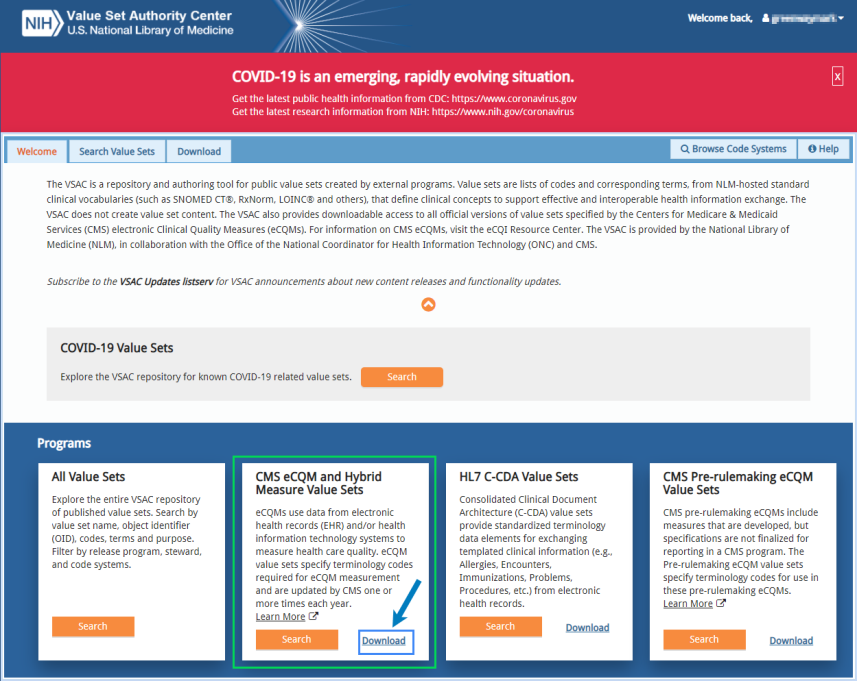
| 2. | Under Programs, in the CMS eCQM and Hybrid Measure Value Sets option, select Download. |
| 3. | On the VSAC Downloadable Resources page, under Centers for Medicare & Medicaid (CMS) Electronic Clinical Quality (eCQM) & Hybrid Measure Value Sets, select 2020 Reporting/Performance Period eCQM Value Sets. |
| 4. | Select May 2019 Release eCQM Value Sets Publication Date: May 10, 2019. |
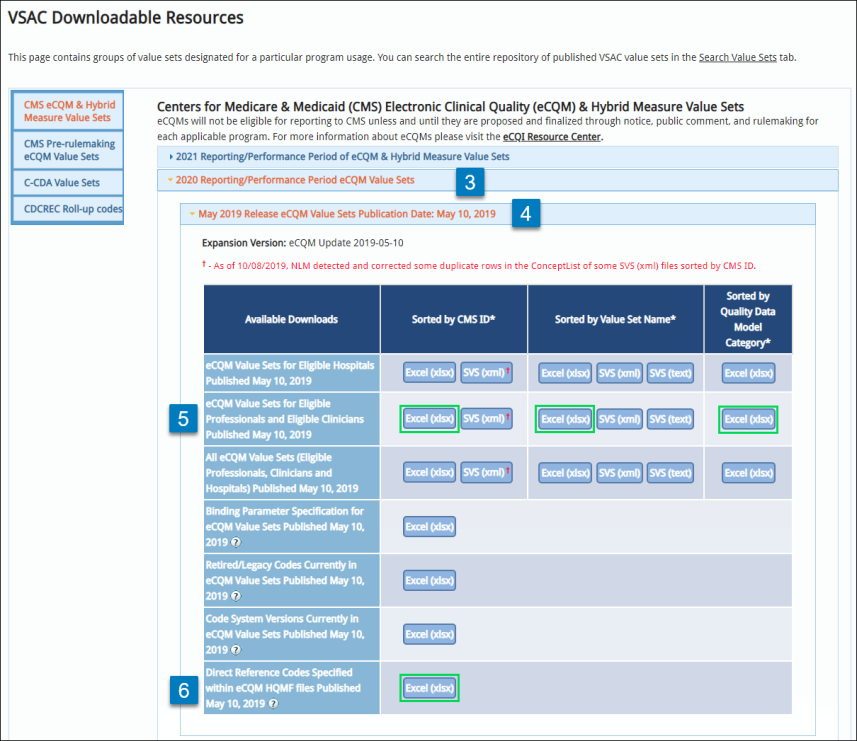
| 5. | On the table that’s displayed, find the eCQM Value Sets for Eligible Professionals and Eligible Clinicians Published May 10, 2019 row. Each column on that row offers the data sorted by a different option: by CMS ID, by Value Set Name, or by Quality Data Model Category. To download a Microsoft Excel spreadsheet, select Excel (xlsx) from the column that offers the data sorted to meet your needs. |
Sorting by CMS ID may be the best option when determining which Value Sets are used by which measure.
| 6. | In the Direct Reference Codes Specified within eCQM HQMF files Published May 10, 2019 row, select Excel (xlsx). |
| 7. | The requested Excel files will be downloaded to your browser's default download location. |
Using Detailed Measure Help for Value Set Contents
The detailed measure help for the eCQMs available in PSR 2020 explains the measure logic and includes links to the values sets used by each measure. When reading the detailed measure help, Value Set names are presented as hyperlinks. Click one of these hyperlinks and your workstation's default browser will launch a VSAC page that displays the content of the selected Value Set. (You must be logged in to VSAC in order to see the contents of the selected Value Set.)
For example, measure CMS 156 Use of High-Risk Medications in the Elderly looks for drug prescriptions that are high-risk when taken by the elderly. Its detailed measure help explains the measure's logic and includes the Value Sets that define which drugs or drug combinations are considered high-risk.
Amoxapine is a high-risk medication when taken by the elderly. The Value Set that identifies Amoxapine prescriptions is referred to as the Amoxapine Value Set. It contains 5 RxNorm codes that can be used to identify a prescription for Amoxapine. Only prescriptions based on one of those RxNorm codes will qualify for the CMS 156 criteria. Click the word Amoxapine and your workstation's default browser will launch a VSAC page that displays the content of theAmoxapine Value Set.
You must be logged in to VSAC in order to see the contents of the selected Value Set.


